

If you run client calls, you need more than a transcription bot. The best tl;dv alternatives in 2025 turn meetings into clean client recaps, internal risks, and tracked next steps – without manual cleanup. This guide compares tools built for sales, CS, and services teams that care about follow-ups, CRM sync, and coaching, not just notes.
We break down where these tools actually help: reducing missed commitments, catching churn signals, and speeding handoffs. You’ll see clear pros and cons, so your team can move from “nice transcript” to “closed loop” in week one.
Quick Overview of Best tl;dv Competitors
- FuseBase – For teams that need client‑ready recaps, internal risk notes, and tasks that flow into shared portals and workflows.
- MeetGeek – For teams that need simple auto‑summaries, highlights, and a searchable library at SMB‑friendly pricing.
- Tactiq – For teams that need fast, lightweight capture from Google Meet/Zoom captions with minimal setup.
- Fireflies.ai – For teams that need broad integrations, automated action items, and decent CRM logging out of the box.
- Read.ai – For teams that need quick summaries plus talk‑time and participation insights to improve meeting hygiene.
- Otter.ai – For teams that need reliable live transcription and shareable notes across general meetings and education.
- Bluedot – For teams that need revenue‑oriented AI notes and snippets with a CI focus at a growing feature depth.
- Jamie – For teams that need rapid, multilingual summaries in a lightweight assistant with basic integrations.
What is tl;dv?
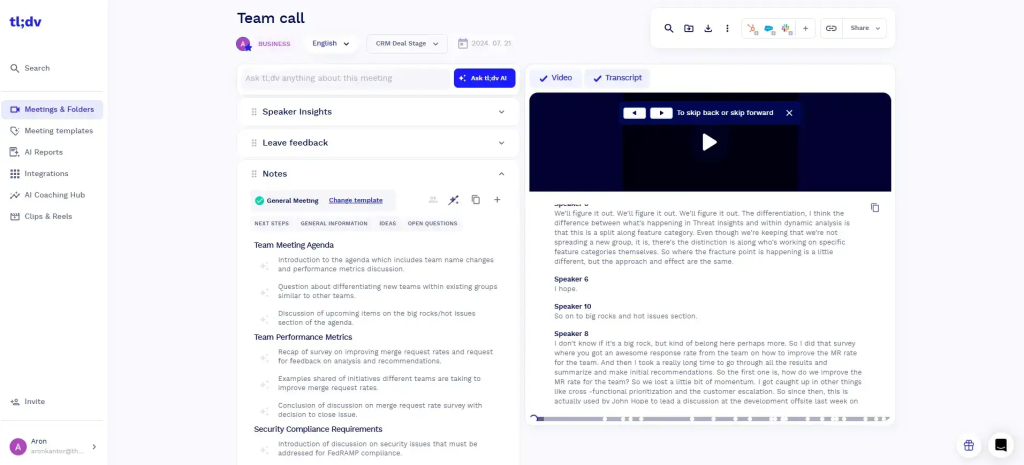
tl;dv is an AI meeting recorder and transcription tool built for Google Meet, Microsoft Teams, and Zoom. It joins calls automatically, records in high quality, and delivers real-time transcripts plus AI-generated summaries after the session. Teams can tag moments, share clips, and organize insights so follow-ups are clear and searchable.
Unlike generic notetakers, tl;dv skews researcher-friendly. Workshop facilitators, UX researchers, and product teams use it to capture group discussions, surface themes, and plan next steps across interviews and collaborative sessions. A Chrome extension and tight Zoom integration make it easy to deploy, and transcription supports 30+ languages.
tl;dv Highlights and Gaps
tl;dv is a popular choice for quick meeting capture and highlight sharing, but it’s built primarily for lightweight internal use. For client-facing teams that need structured follow-ups, branded spaces, or automation, these limits become more visible as workflows scale. Below is a look at where tl;dv performs well and where it leaves gaps.
Top features
- Live recording with real-time transcription
- Timestamped highlights for quick navigation
- Chrome extension and native Zoom app for fast capture
- Built-in recording library with keyword search
- Shareable clips for async follow-ups
- Team collaboration: tagging, comments, and assignable action items
- Multi-meeting intelligence to spot themes and email summary reports
Limitations
- Free plan has tight caps, no downloads, and limited customization
- Limited post-meeting workflows: no automated follow-ups, task creation, or CRM syncing
- No branded or structured client spaces; lacks internal vs. client note separation
- Basic analytics with minimal insight into engagement, patterns, or team performance
- Conversation intelligence is surface-level: lacks sentiment, coaching, and AI scoring
tl;dv excels for research-driven teams that need clean transcripts, quick highlights, and collaboration. However, it falls short on deeper CI and CRM workflows. If you need richer analytics or tighter pipeline hygiene, consider tl;dv alternatives that are listed below.
Best 6 tl;dv Alternatives
1. FuseBase – Best overall for client meetings, follow-ups, and branded collaboration
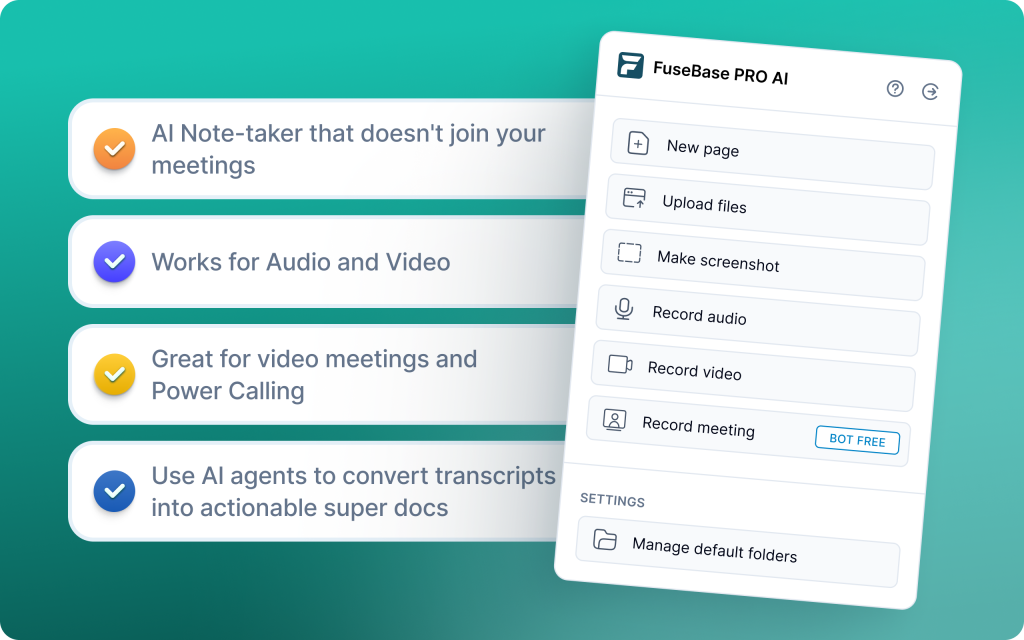
FuseBase is a bot-free AI meeting recorder and workspace that turns every Zoom, Teams, or Meet call into a shareable mini-room with recap, files, and next steps. Unlike tl;dv’s recorder-first approach, FuseBase packages the output so clients and partners immediately see what matters while your team keeps internal notes private. Each mini-room becomes the hub for follow-ups, so tasks, trackers, and handoffs live where the conversation started. Built-in AI agents watch calls for risk, opportunities, and action items, then convert those into real tasks and workflows across your tools. With FuseBase, the recorder is the wedge into ongoing client rooms, not a dead-end link. If you need client-ready outputs and operational follow-through, FuseBase goes beyond tl;dv’s researcher-centric notes.
Pros
- Bot-free recorder that creates mini-rooms with recap, files, and next steps
- AI agents that auto-flag risks, opportunities, and follow-ups, then push real actions
- Client-facing views plus private internal notes by default
- Branded client and partner portals for ongoing deal and delivery rooms
- Transcripts, tasks, trackers, and automated workflows in the same platform
- Strong fit for agencies, B2B SaaS sales and CS, and professional services
Cons
- More powerful than a simple notetaker, so setup can feel heavier if you only need quick transcripts or highlights
- Researcher-first templates are not the primary focus compared to tl;dv
2. MeetGeek – Best for teams needing analytics across multiple clients
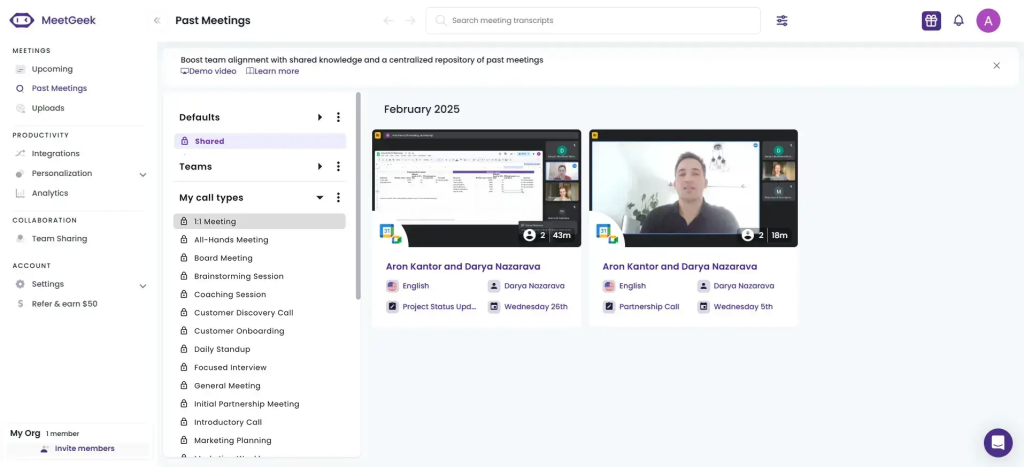
MeetGeek is a strong pick if you want a recorder that does more than capture text. It transcribes, records, summarizes meetings and uploaded audio/video across Zoom, Microsoft Teams, and Google Meet. Its AI summaries are a standout: it breaks conversations into tasks, next steps, concerns, facts, and decisions, and you can edit them easily. For sales teams, MeetGeek layers in conversation intelligence like talk-time, sentiment, participation, and coaching insights. Collaboration is smooth: users can create and share snippets, comment on notes, and push recaps to teammates. If you’re evaluating tl;dv, MeetGeek often wins on out-of-the-box summaries and accessible coaching analytics without a long learning curve.
Pros
- Accurate transcriptions in many scenarios; supports 50 languages
- Conversation intelligence (talk-time, sentiment, participation) available on free plan
- Wide integration surface (+7000 via connectors), including major CRMs
- Searchable recording library with folders, filters, and auto meeting-type notes
- Mobile apps (iOS/Android) for in-office recordings and notes
Cons
- Meeting syncing can be slow
- Can’t start transcription mid-meeting unless pre-scheduled
- Transcription can struggle with heavy accents, jargon, and industry terms
3. Tactiq – Best for quick transcription during client calls

Tactiq is an “AI Meeting Kit” focused on fast, real-time transcription across Google Meet, Microsoft Teams, and Zoom. It captures speakers with timestamps, generates concise summaries and action items, and offers handy engagement analytics that many recorders skip. With a lightweight Chrome extension and easy app links, it’s a strong pick for individuals and small teams who want instant notes without heavy setup. For quick capture and on-the-fly tasking, Tactiq can be a better option than tl;dv.
Pros
- Real-time transcription with speaker ID and timestamps
- Translations in 60+ languages and a localized UI in 7 languages
- Strong AI summaries that surface key insights to rewatch
- Task assignment from meeting discussions, plus agenda suggestions
- Simple integrations for Slack updates and Jira ticket creation
Cons
- Limited sales coaching and no deep revenue analytics
- No multi-meeting intelligence to connect patterns across calls
- Video recording is limited
4. Fireflies.ai – Best for teams with multilingual clients
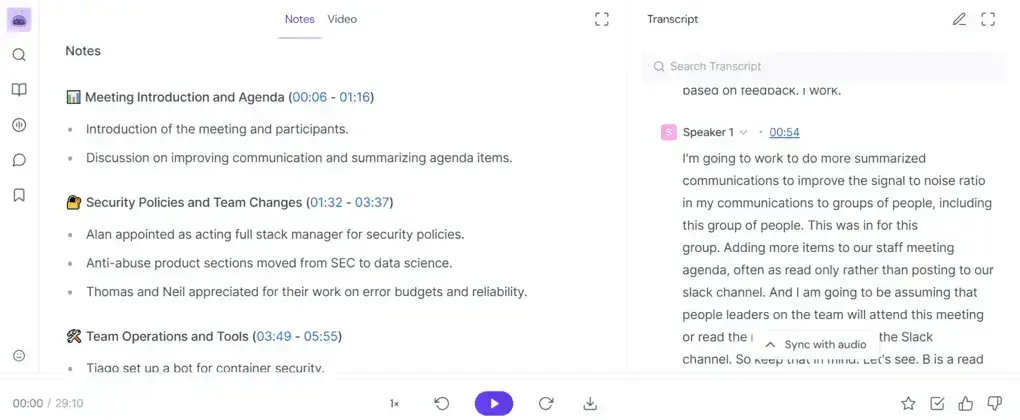
Fireflies automates note-taking across Zoom, Microsoft Teams, Google Meet, and more, with accurate transcription and interpretation in 40+ languages and dialects. It is platform agnostic, quick to deploy at scale, and priced accessibly, making it a strong fit for teams standardizing capture and search across many tools. You can upload files on the free plan, then unlock advanced collaboration and unlimited storage on business tiers. Compared with tl;dv, Fireflies often wins for multilingual coverage, platform breadth, and team-wide rollout at lower total cost.
Pros
- Accurate interpretation and transcription in 40+ languages and dialects
- Quick to deploy at scale with minimal training
- Searchable conversation history with tagging and filters
- Easy integrations across conferencing, collaboration, and CRM tools
- Askfred chatbot to ask questions related to meetings, generate agendas, or draft follow-up emails
Cons
- Video recording is only in the Pro plan
- Bot can take time to join meetings
- Summary quality can be context dependent without structure or human review
5. Read.ai – Best for client engagement analysis
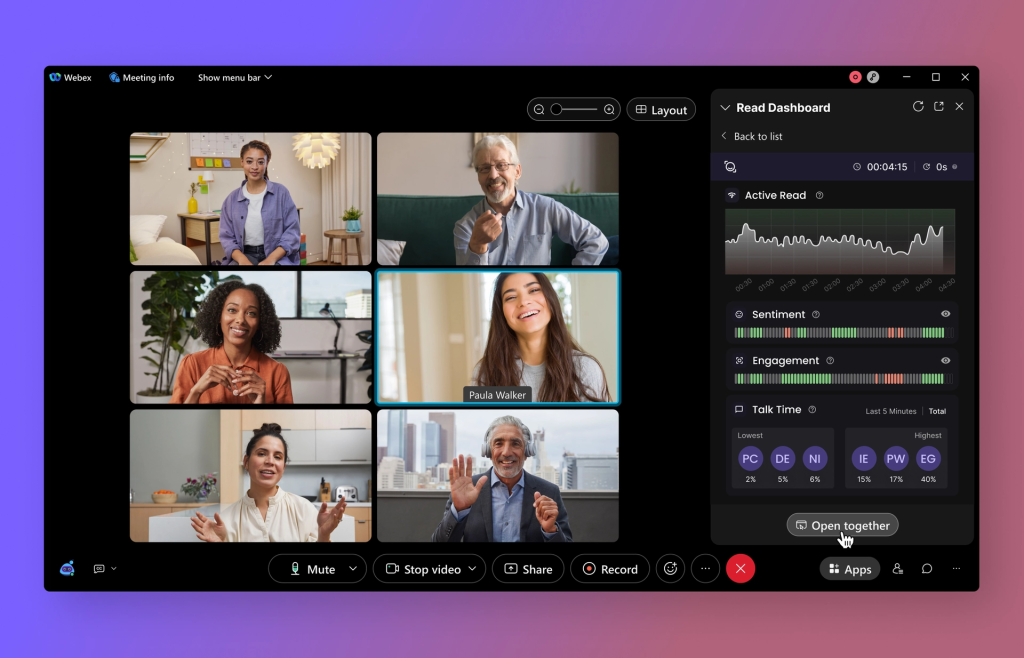
Read.ai prioritizes automatic note-taking, smart summarization, and real-time collaboration during meetings, with a heavy emphasis on engagement and speaker performance. It transcribes calls while tracking sentiment, participation, and audience reactions, then converts discussions into clear summaries and action items. Its Transcription 2.0 adds coaching cues tied to your speaking style, so teams can improve delivery over time. For teams that want instant documentation plus performance analytics, Read.ai delivers quick setup and easy adoption. As a tl;dv alternative, it stands out for engagement analytics and coaching signals rather than deep workflow handoffs.
Pros
- Helps you multitask by auto-generating summaries, action items, and speaker context
- Strong bilingual translation performance, especially Spanish to English
- Search Copilot to query across meetings, emails, and docs in plain language
- Meeting summaries capture essentials cleanly for quick handoffs
- Useful coaching and engagement metrics for ongoing team improvement
Cons
- Bot can persist or rejoin meetings even after deactivation for some users
- Free plan is too limited for many companies to run a proper trial
- Bot may auto-attach to calendars and meetings, creating friction
6. Otter.ai – Best for shared client documentation
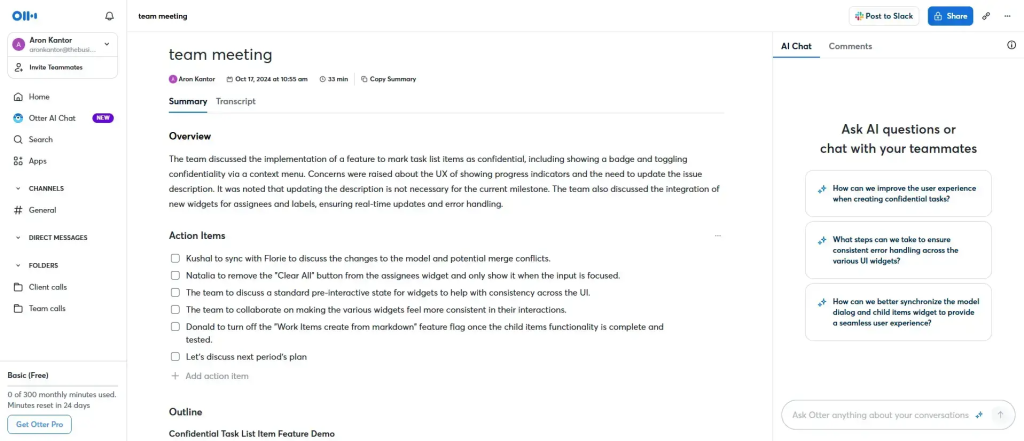
Otter.ai focuses on real-time transcription with strong team-sharing and collaboration, making it a solid pick for creating a single source of truth after client calls. Live captions improve accessibility for hybrid teams, while shared notes, highlights, and comments keep everyone aligned without waiting for post-meeting handoffs. Note: video recording isn’t included in most plans, so Otter is best when transcripts and shared notes are the priority.
Pros
- Real-time, accurate transcription for fast shared documentation
- Otter AI chat can answer questions about the meeting content
- Clear speaker identification for better context and follow-up
- Strong team collaboration: annotate, highlight, comment, assign tasks
- Mobile apps and Zoom auto-transcription streamline daily use
Cons
- No video recording on most plans
- Limited multilingual support (primarily English, with some support for Spanish and French)
- Occasional transcription inaccuracies reported
7. Bluedot – Best for clean, polished client-ready notes
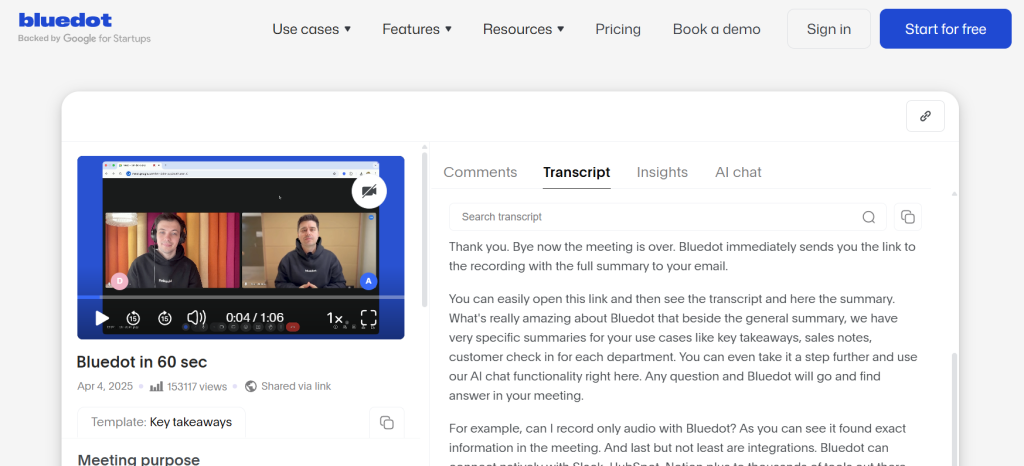
Bluedot is a bot-free, browser-based recorder that captures meetings in the background and turns them into client-ready notes. It’s built for customer-facing teams, especially Google Meet users, and can push summaries and action items straight into Salesforce, Notion, and Slack. The bot-free approach reduces meeting disruption and privacy concerns while keeping capture reliable. It’s great for sales and support workflows that value clean client summaries. If you want clean, shareable notes without bot interruptions and fast CRM handoffs, Bluedot is a compelling tl;dv alternative.
Pros
- Polished, client-ready summaries with minimal editing
- No meeting bots joining, improving comfort and compliance posture
- Strong Google Meet experience and fast capture
- Direct CRM/knowledge tool handoffs
- Searchable archives for quick account context
Cons
- Limited workflow depth beyond summarization; lacks automation, task creation, and CRM syncing
- Language coverage is narrower than tools offering 30+ languages (supports 17)
- Best experience is Meet/Chrome-centric; non-Chrome environments may feel constrained
8. Jamie – Best lightweight client-call summarizer
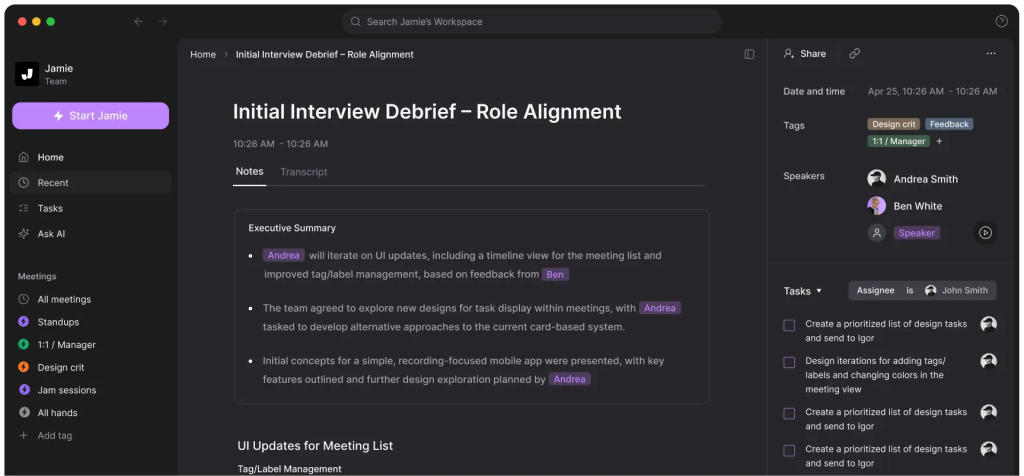
Jamie takes a bot-free route by recording system audio directly, so it never joins your meetings as a participant. That keeps sessions private and undistracting while still capturing everything across Teams, Google Meet, and other platforms. It also supports offline recording and auto-deletes audio after transcription, reducing retention risk. Summaries are template-driven to highlight decisions, action items, and key moments, and speaker recognition helps attribute who said what without extra setup. If you want a fast, private recorder that turns calls into concise, client-ready summaries without bots joining, Jamie is a strong tl;dv alternative
Pros
- No-bot recording enhances participant comfort and privacy posture
- Clear, customizable summaries with decisions and action items
- Accurate speaker identification without manual tagging
- Generates transcripts, summaries, action items, and decisions
- Offline-ready with automatic cleanup after processing
Cons
- Focuses on lightweight capture and summaries rather than deep in-meeting collaboration
- Workflow automation and multi-meeting analytics may be lighter than in other tools
Conclusion
Teams need tl;dv alternatives that don’t stop at transcripts but drive revenue moments forward: client-ready recaps, private risk notes, tasks that actually get tracked, and clean CRM hygiene.
When evaluating tl;dv alternatives, measure time to value and workflow depth: how fast does the tool move from transcript to tasks and CRM updates, how well does it support your platform mix (Zoom, Teams, Meet), and does it meet your privacy posture (bot vs bot-free) and language needs. If you’re optimizing for coaching analytics alone, specialized CI tools may fit; if you need reliable caption capture, lightweight extensions can suffice. But if you want meeting output to become real work inside shared portals and trackers without duct tape, choose FuseBase to make your recorder the wedge into ongoing deal, onboarding, and delivery rooms.