

If Fathom AI is your current go-to for meeting notes, you already know the appeal: quick summaries, action items, and searchable transcripts without the manual cleanup. But depending on your workflow, you might need something Fathom doesn’t fully cover – stronger integrations, better speaker recognition, more control over sharing, team analytics, or a more client-ready way to package recaps.
In this guide, we’ll compare the best Fathom AI alternatives for AI meeting notes, breaking down what each tool does best, where it falls short, and which option fits different teams.
TL;DR – Fathom AI Alternatives By Use Case
- FuseBase – Best for client-facing teams that need meeting notes turned into shareable, branded deliverables (plus tasks, docs, and follow-ups in one workspace).
- MeetGeek – Best for automatic recording + clean summaries with a strong “set-and-forget” workflow for teams.
- Krisp – Best for improving call quality (noise cancellation) while still getting AI notes and takeaways.
- Otter.ai – Best for fast transcription and searchable meeting memory with solid live note-taking.
- tl;dv – Best for highlights, clips, and reviewing multi-speaker calls; great for recurring internal workshops and customer calls.
- Read.ai – Best for meeting analytics (engagement, “meeting health”) plus summaries and action items.
- Avoma – Best for sales/CS teams that want conversation intelligence and coaching, not just notes.
What is Fathom AI?
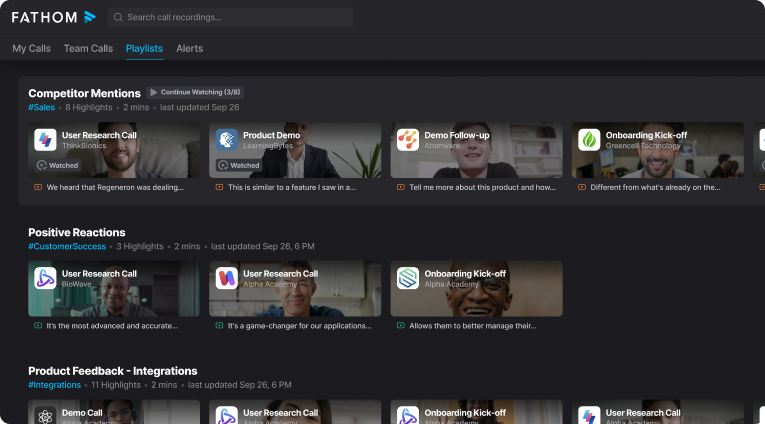
Fathom AI is a meeting assistant and transcription tool built to record, transcribe, highlight, and summarize calls so you can stay focused on the conversation. It offers real-time transcription in seven languages and a generous free plan for individual users. Customer managers use it to capture and share key moments with clients, building transparency and trust. Clients can jump to specific sections of the recording to revisit complex topics without scrubbing through an entire call.
Fathom auto-generates notes and syncs them with the right sections in your CRM, including Salesforce and HubSpot, and connects easily to Google Docs, Notion, and Asana. A standout touch is the ability to create highlights mid-call and have its AI summarize them with a click, then push those notes alongside your broader research.
Why Teams Look for Fathom AI Alternatives
Fathom AI is a strong option for quick meeting summaries, but many teams outgrow it once meeting notes become part of a bigger workflow. The most common reason is fit: what works perfectly for individual note-taking doesn’t always scale for client-facing delivery, cross-team collaboration, or compliance-heavy environments.
Teams typically start searching for alternatives when they need one (or several) of the following:
- More reliable summaries and action items for sales and customer calls (less editing after the meeting).
- Deeper integrations with CRMs and project tools so next steps become tasks automatically.
- Better sharing controls for external stakeholders (client-ready pages, permissions, branding).
- Stronger team features like libraries, analytics, admin management, and standardized templates.
- Different recording preferences (bot-free capture, fewer meeting join issues, or tighter privacy controls).
- Conversation intelligence and coaching (deal insights, objections, trend reporting), not just notes.
The 7 Best Fathom AI Alternatives
1. FuseBase
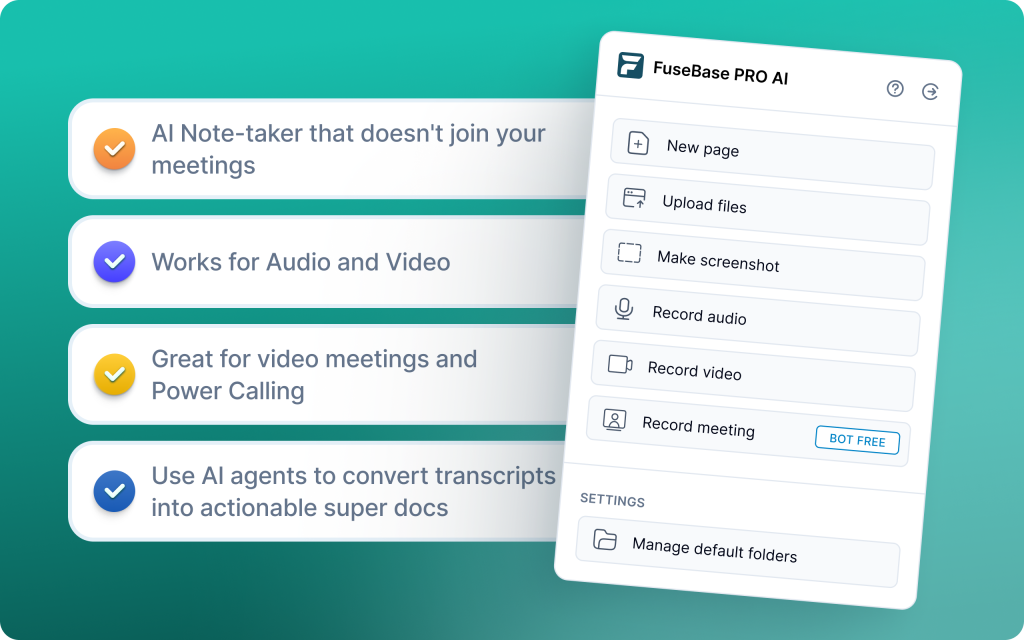
FuseBase is a bot-free recorder and workspace that turns every Zoom, Teams, or Meet call into a branded mini-room with recap, decisions, next steps, and supporting assets. Instead of a transcript link, you share a guided, white-label space under your domain that clients can return to. AI agents watch calls for risks, opportunities, and follow-ups, then auto-create tasks, populate trackers, and trigger workflows in your CRM or project tools. Dashboards surface real signals like no next meeting, scope creep, or renewal risk so leaders can act, not sift.
Where FuseBase wins
- Turns meetings into client-ready deliverables, not just notes.
- Branded mini-rooms clients can revisit (recap, decisions, assets).
- Deeper conversational intelligence with trackers for real revenue and retention signals.
- Workflow-ready outputs: tasks, CRM updates, and automated next steps
- Visibility for leaders via dashboards (renewal risk, scope creep, no next meeting).
Considerations
- Not the lightest tool if you only need basic transcription + summary
- Requires light setup to match branding, templates, and tracker definitions
Best-fit teams
- Agencies, consultancies, and professional services that share client-facing recaps
- B2B SaaS sales and CS teams that need clean send-ready notes plus internal risk flags
- Partner and channel motions that benefit from reusable, branded deal rooms
- Mid-market orgs that care about handoffs, accountability, and faster follow-through
2. MeetGeek
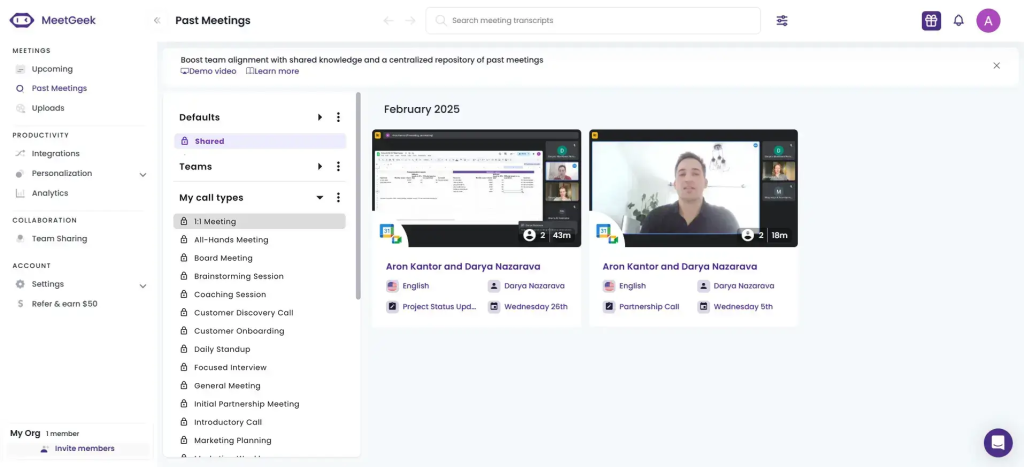
MeetGeek is a tidy, automation-first meeting assistant that records, transcribes, and summarizes online meetings and uploaded audio/video files. It supports up to 50 languages across Zoom, Microsoft Teams, and Google Meet, and delivers fast AI summaries without heavy setup. With integrations (HubSpot, Slack, Google Calendar), custom templates, folders, and timestamped highlights, it slides into existing workflows quickly.
Where MeetGeek wins
- Live meetings and pre-recorded files, with strong multilingual support.
- Templates, folders, and timestamped highlights for quick review and handoff.
- 2,000+ integrations keep notes and actions flowing to your tools.
- Meeting analytics, sentiment, and performance metrics to guide follow-ups.
Considerations
- Free plan limits transcription features; some advanced capabilities sit behind higher tiers.
- No simultaneous multilingual transcription; pricing can climb for small teams.
Best-fit teams
- Sales orgs needing quick adoption, clean summaries, and CRM-friendly handoffs.
- Managers running weekly team meetings and 1:1s who want consistent templates and searchable history.
- Ops/enablement teams standardizing outcomes with folders, auto-sharing, and basic analytics.
3. Krisp
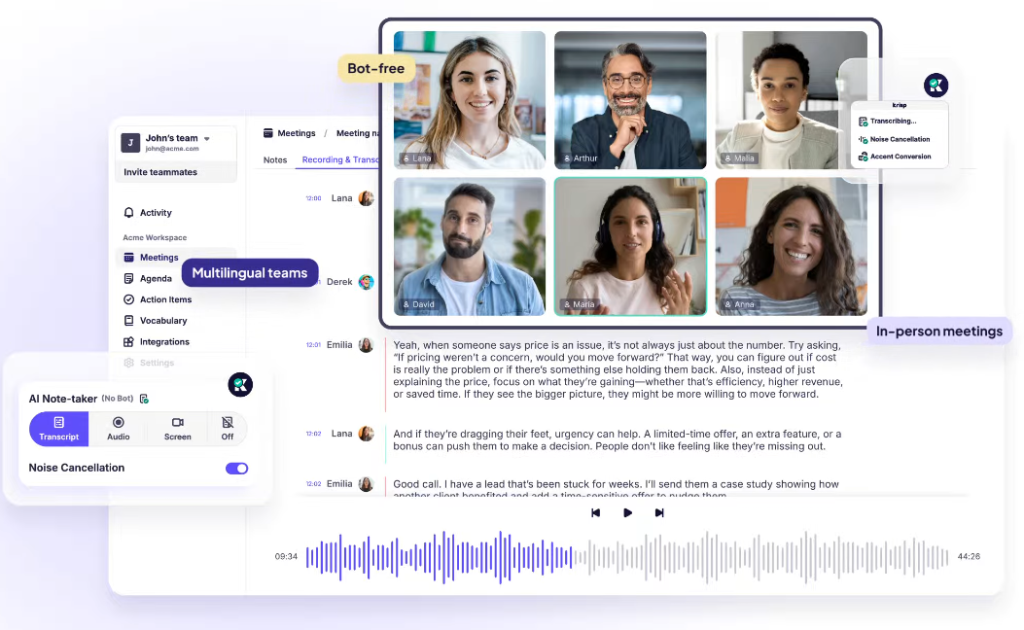
Krisp focuses on call quality and lightweight capture. It delivers bot-free operation with real-time AI noise cancellation, accent/voice clarity tools, and unlimited free transcriptions, preserving privacy while keeping audio clean. Meeting notes and summaries are generated on-device/endpoint, with integrations for Zoom, Google Meet, and Microsoft Teams. With mobile support, Krisp is great when you need clear audio and simple summaries without adding a meeting bot.
Where Krisp wins
- AI noise cancellation removes background noise, echo, and external voices in real time.
- No joiner bot, fewer consent hurdles, and stronger privacy posture.
- Unlimited free transcription: Easy entry for individuals and small teams to trial at scale.
- Desktop and mobile support to record and transcribe on the go.
Considerations
- Lacks deep deal analytics, coaching, and forecasting
- Aggressive noise suppression can affect voice quality in edge cases.
Best-fit teams
- Freelancers, remote workers, and customer support teams in noisy environments.
- Call centers prioritizing clarity and compliance-friendly, bot-free capture.
- Teams needing simple transcription and summaries with multilingual support.
- Orgs that value audio quality and privacy more than advanced revenue analytics.
4. Otter.ai
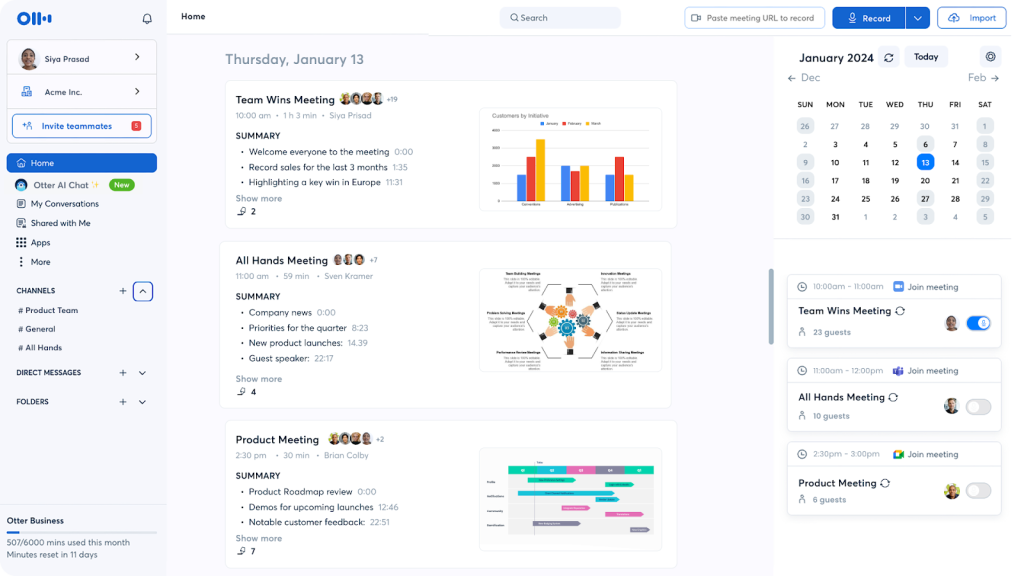
Otter.ai is a transcription-first tool built for live capture and quick answers during the call. Its standout is Otter AI Chat, which lets you ask real-time questions like “What were my action items?” and get instant responses from the ongoing conversation. You can upload pre-recorded audio or video for transcription, add timestamps and highlights, and share summaries for fast alignment. Otter records audio by default and provides live captions, with video recording available on Enterprise.
Where Otter wins
- Real-time transcription that is easy to follow during the meeting
- Otter AI Chat for instant Q&A on decisions, action items, and highlights
- Simple upload workflow for pre-recorded content with quick turnaround
- Collaborative edits, timestamps, and highlights to streamline follow-ups
Considerations
- Accuracy can dip with strong accents or heavy jargon
- Emphasizes transcription over deep note-taking, coaching, or revenue analytics
Best-fit teams
- Teams that need live captions and real-time Q&A during the meeting
- Journalists, media teams, and universities running interviews and lectures
- Small teams that want fast, shareable transcripts without heavy setup
- Orgs that prioritize immediate clarity over forecasting
5.tl;dv
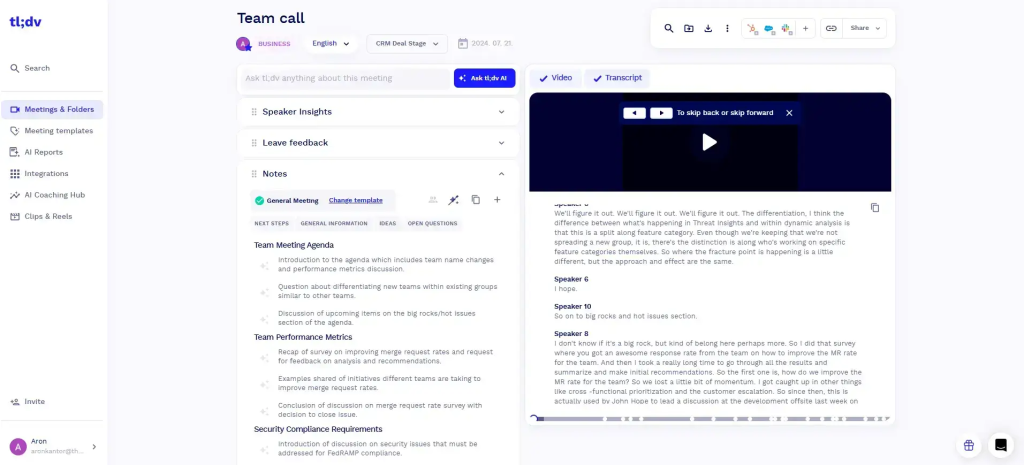
tl;dv records calls, generates transcripts, and turns insights into shareable highlights that teams can tag and revisit. It’s built with researchers in mind – user interviews, product discovery, and cross-functional workshops – and works across Zoom, Google Meet, and Microsoft Teams. A searchable library, timestamped highlights, and lightweight AI summaries make it easy to synthesize multiple sessions into themes.
Where tl;dv wins
- Research-first workflow: intuitive tagging, timestamped highlights, and team libraries for fast synthesis
- Cross-platform support (Zoom, Google Meet, Microsoft Teams) and 30+ languages
- Clip sharing and quick recaps for product and UX teams
- Pushes insights to Slack, Notion, CRM, and via Zapier for 6,000+ tools
Considerations
- Lacks deep coaching, call scoring, or revenue analytics
- CRM logging is limited – better for knowledge-sharing than pipeline hygiene
Best-fit teams
- Product, UX, and research squads running frequent interviews and workshops
- Cross-functional teams that need quick, shareable clips and trend rollups
- Global teams requiring multilingual transcription and easy async alignment
- Startups prioritizing lightweight setup over heavy CI or forecasting features
6. Read.ai
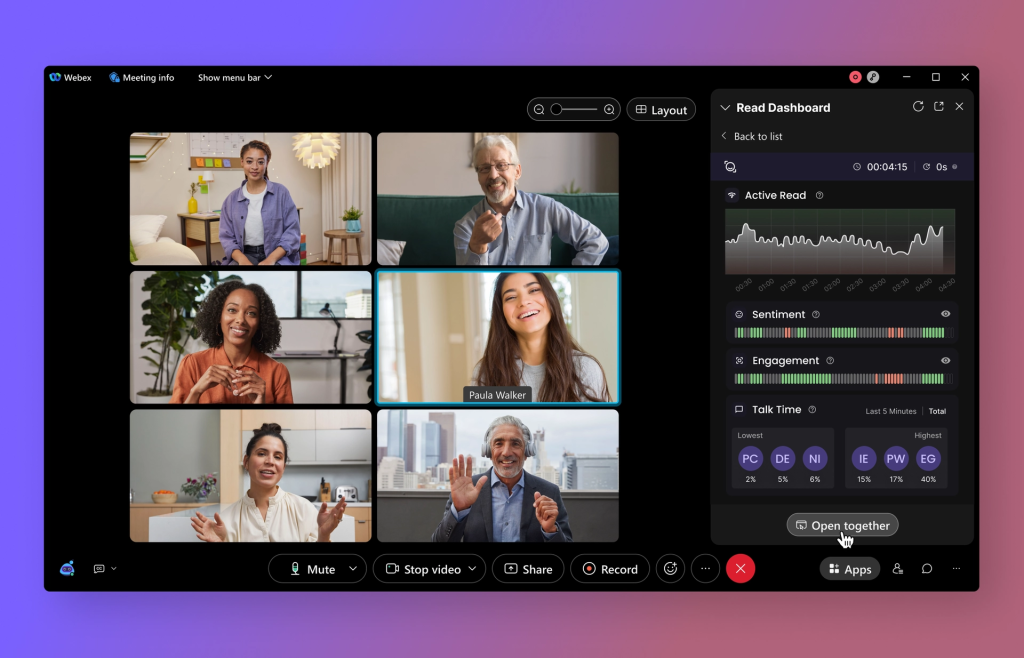
Read.ai focuses on analytics-rich call recording and summaries with real-time sentiment, engagement scoring, and speaker coaching. Its Transcription 2.0 layers audience reactions onto transcripts, while AI-generated MoMs (minutes of meeting) capture decisions and action items clearly. Search Copilot lets you query across meetings, emails, and docs in natural language to retrieve context fast. Setup is quick, translation quality is strong (notably Spanish-English), and recognizable in-meeting branding reduces confusion.
Where Read.ai wins
- Sentiment, engagement, and clear MoMs that capture essentials
- Coaching and performance: feedback on clarity, talk-time, and filler words to uplevel speakers
- Search Copilot pulls answers from meetings, email, and docs
- Accurate bilingual transcription and summaries (esp. Spanish-English)
Considerations
- Bot behavior can be sticky – users report it joining even after deactivation and auto-attaching to calendars
- Heavier enterprise footprint than a lightweight notetaker; governance needed for bot/calendar access
Best-fit teams
- Enterprises and cross-functional orgs prioritizing sentiment/engagement analytics and coaching
- Ops and enablement teams needing reliable MoMs and performance feedback at scale
- Global teams requiring accurate translation and searchable knowledge across systems
- Leaders who want dashboards to track meeting quality and alignment across departments
7. Avoma
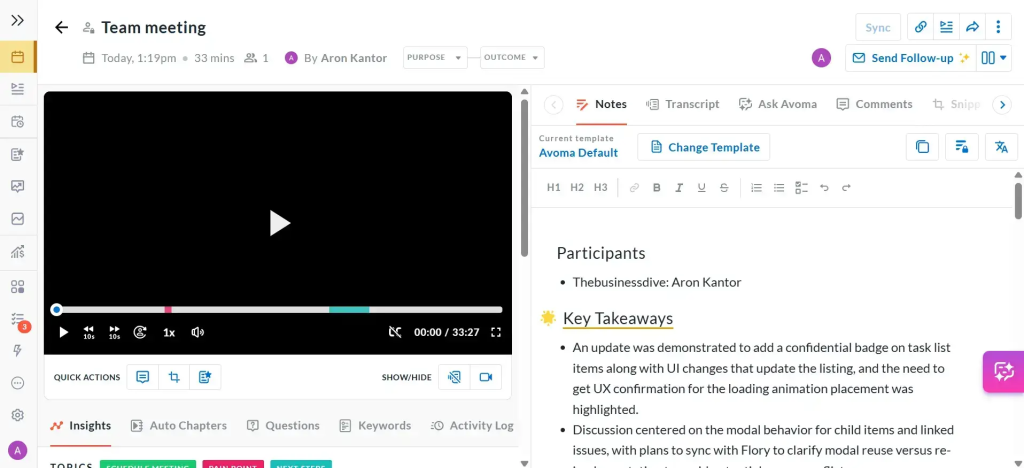
Avoma is a cross-functional meeting assistant with light revenue intelligence that automates transcription, AI notes, and follow-ups, then syncs everything to your CRM and conferencing stack. It detects action items, objections, and positive moments, while custom scorecards help managers coach reps consistently. Real-time transcription and agenda templates make prep and review faster, so sales, CS, and product teams can focus on the conversation, not the admin.
Where Avoma wins
- Real-time transcription, AI notes, and automatic follow-ups that push to CRM
- Revenue signals: flags deal risk, compliance gaps, and coaching opportunities with custom scorecards
- Chaptered notes, shared agendas, and comments keep teams aligned
- Native sync to Salesforce/HubSpot reduces double entry and missed updates
Considerations
- Assistant may join late on some calls; verify capture for mission-critical meetings
- Advanced features carry a steeper learning curve for admins and managers
Best-fit teams
- Sales and CS orgs that want reliable recording, structured AI notes, and instant CRM sync
- RevOps leaders standardizing agendas, scorecards, and follow-up workflows
- Cross-functional teams (sales, success, product) needing shared insights and searchable call history
Summary: Choosing the Right Fathom AI Alternative
The best Fathom AI alternative depends on what you need after the meeting – not just during it. If you’re sharing recaps with clients and want a polished, reusable space (not a transcript link), FuseBase is the strongest pick. If you want reliable “set-and-forget” recording with consistent summaries for the whole team, MeetGeek is a safe choice. For teams that care about call quality as much as notes, Krisp stands out.
If your priority is fast transcription and a searchable meeting memory, choose Otter.ai. If you run lots of workshops or recurring calls and need highlights, clips, and fast review, tl;dv is the best fit. For meeting analytics and engagement signals, Read.ai adds a layer of “meeting health” insights. And if you want deeper sales/CS intelligence and coaching, Avoma is the most purpose-built option. Whichever tool you choose, prioritize the one that turns summaries into next steps your team will actually follow.