

If you rely on meeting transcripts to capture decisions, track progress, or share updates with teammates, you’ve probably tried tools like Tactiq. But in 2026, the landscape is bigger and better than ever. More accurate transcription, cleaner speaker labels, faster summaries, and integrations that actually fit modern workflows. The right transcript tool can save hours every week and reduce “what did we agree on?” follow-ups. In this guide, we’ll break down the best Tactiq alternatives for meeting transcripts, highlighting the options that deliver reliable accuracy, searchable notes, and export formats teams can use immediately.
30-Second Overview
- Need client-ready transcripts and internal coaching in one flow – pick FuseBase.
- Want fast summaries and clips – pick Fathom.
- Need search at scale with automation – pick Fireflies.
- Need live captions and mid-call Q&A – pick Otter.
- Want analytics on top of accurate transcripts – pick MeetGeek or Read.ai.
- Want structured notes with CRM hygiene – pick Avoma.
What is Tactiq?
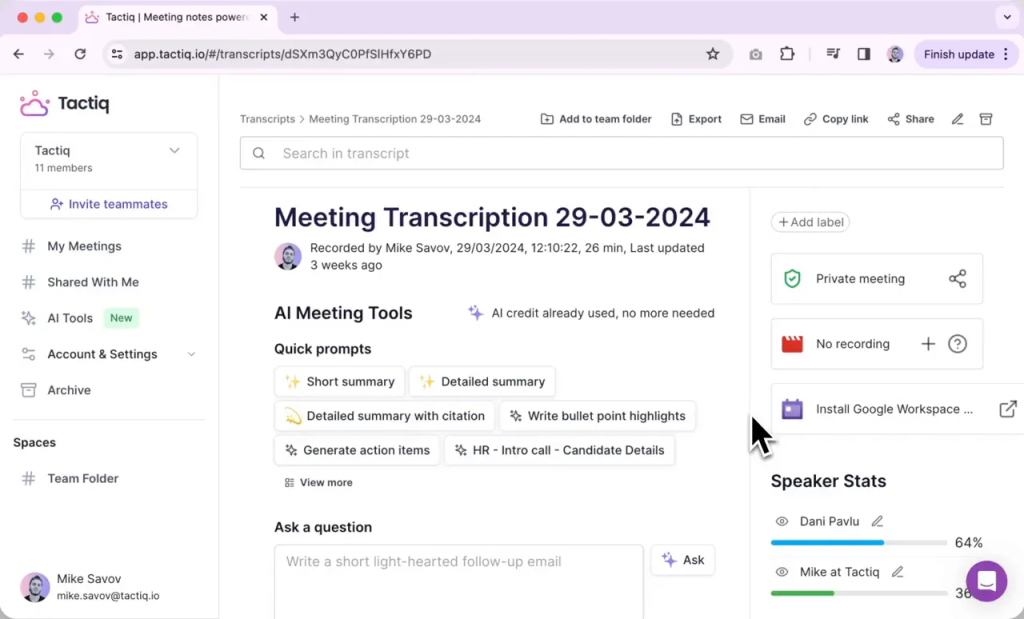
Tactiq is an AI-powered meeting note tool that captures and organizes transcripts from online meetings. It’s commonly used as a Chrome extension and is popular with people who want searchable, copy-friendly transcripts they can quickly turn into notes. Depending on your workflow, Tactiq can help you review conversations faster, highlight key moments, and reuse transcript snippets for follow-ups or documentation. For teams that rely heavily on written records of meetings, it’s often seen as a lightweight way to keep everything in one place without manually typing notes.
Tactiq Pros and Cons
Tactiq Pros
- Fast meeting transcripts: Tactiq quickly captures what was said so you don’t have to take manual notes.
- Searchable notes: Makes it easy to find key moments, quotes, or decisions later.
- Simple to use: Lightweight setup and a straightforward workflow for individuals and small teams.
- Useful for follow-ups: Helps turn conversations into shareable notes and meeting recaps.
- Good for documentation: Handy for recurring meetings, client calls, interviews, and internal updates.
Tactiq Cons
- Accuracy can vary: It may struggle with accents, cross-talk, poor audio, or jargon-heavy meetings.
- Automation depth may be limited: Some users may want stronger AI summaries, clearer action items, or better “owner” detection.
- Integrations may not cover every workflow: Depending on your stack, you might need deeper connections to CRMs, PM tools, or knowledge bases.
- Collaboration features may feel basic: Larger teams often need more robust sharing, permissions, and team management.
- Not always ideal for complex meetings: Multi-speaker calls and fast back-and-forth discussions can be harder to structure cleanly.
7 Best Tactiq Alternatives in 2026
1. FuseBase
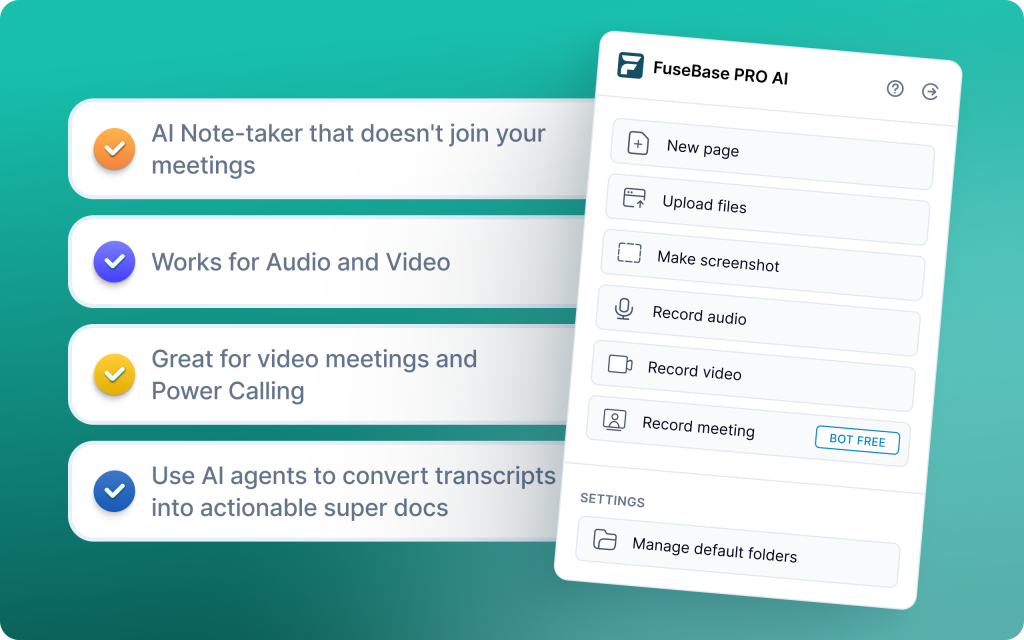
FuseBase is a bot-free meeting recorder that turns every Zoom, Teams, or Meet call into a branded mini-room with transcript, recap, files, and next steps. It goes beyond note-taking to a Client Delivery Platform, automatically partitioning outputs into a safe-to-share client portal and a private internal workspace. AI agents watch calls for risk, opportunities, and follow-ups, then push real actions into your tools so transcripts translate into progress. Trackers flag real signals like scope creep, missing next meeting, or renewal risk, giving you cross-meeting context by account or project. The result: clean, client-ready transcripts paired with internal coaching notes and workflow automation in one place.
Why choose FuseBase
If transcripts must drive delivery, FuseBase wins – mini-rooms per meeting, white-label by default, and an internal vs external split that protects sensitive coaching while keeping clients aligned. Deeper intelligence and automation reduce admin and protect margin by turning transcript insights into tasks, trackers, and dashboards instantly. FuseBase is ideal for professional services, agencies, and CS teams managing high-value clients who need polished share-outs and measurable follow-through.
2. Fathom
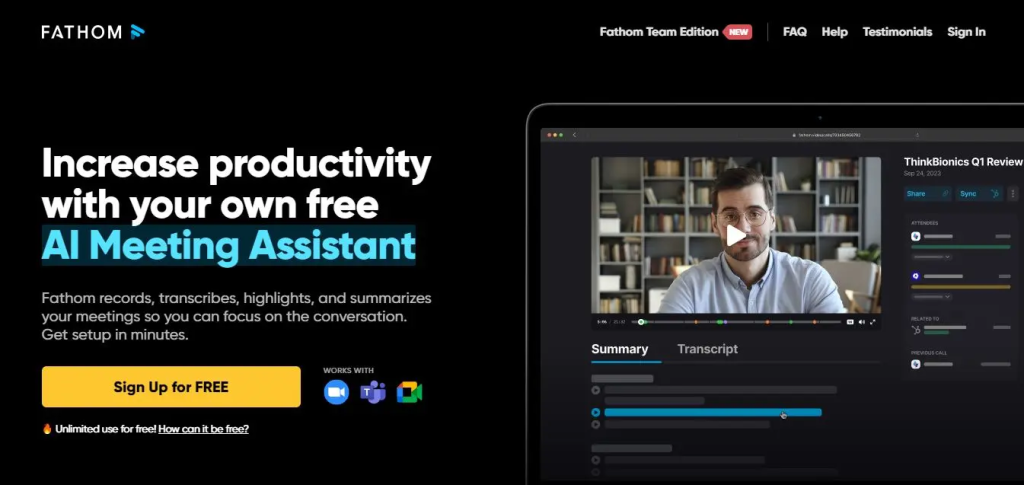
Fathom records, transcribes, and summarizes Zoom, Google Meet, and Teams calls, then pushes AI-generated notes and action items to CRMs like Salesforce, HubSpot, and Close. Right after the call, you get clear summaries with timestamps and one-click highlights, so you can tag next steps without replaying the whole meeting. It supports 25+ languages and shares clips to Slack or Notion for quick team updates. Fathom also drafts follow-up emails and task reminders, helping reps act fast without switching tabs.
Why choose Fathom
Choose Fathom if you want fast, accurate transcripts that immediately convert into CRM-ready notes and follow-ups. It’s a strong pick for teams that prioritize instant summaries, highlight sharing, and low-friction execution after every call.
3. Fireflies.ai
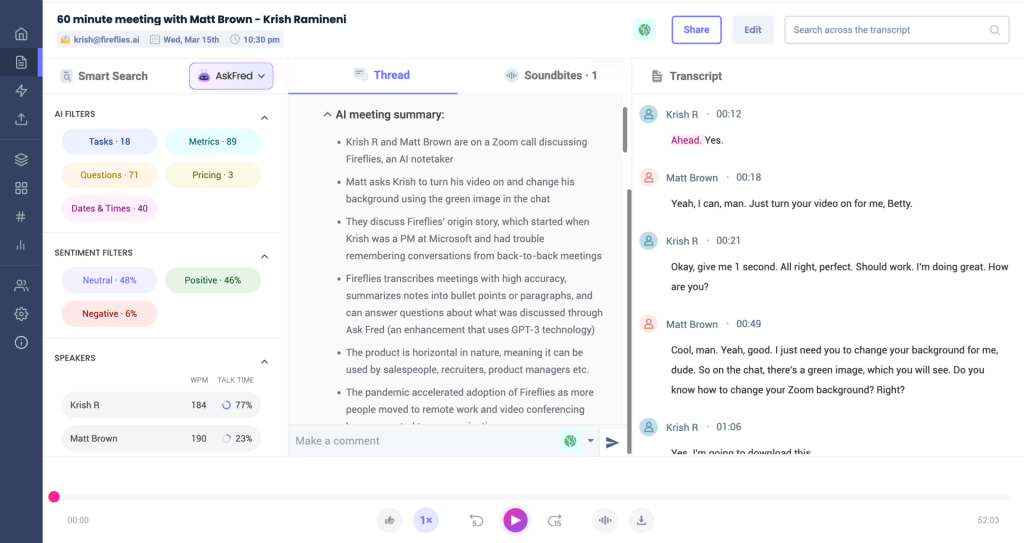
Fireflies is a simple, affordable AI notetaker that records and transcribes meetings across platforms, then generates GPT-4 powered summaries with highlights, action items, and topic-wise notes. It logs key points to CRMs, supports comments and tagging for async collaboration, and offers smart search filters to surface questions, metrics, and dates across your call library. AskFred lets you query meetings, draft agendas, and spin up follow-up emails without leaving your workspace. While it lacks advanced coaching or forecasting, it delivers fast documentation and searchable transcripts with minimal setup.
Why choose Fireflies
Pick Fireflies if you want cross-platform capture, quick AI summaries, and strong search without a heavy rollout. It is a budget-friendly way to standardize transcripts and automate basic follow-ups while keeping your CRM updated.
c
4. Otter.ai
c
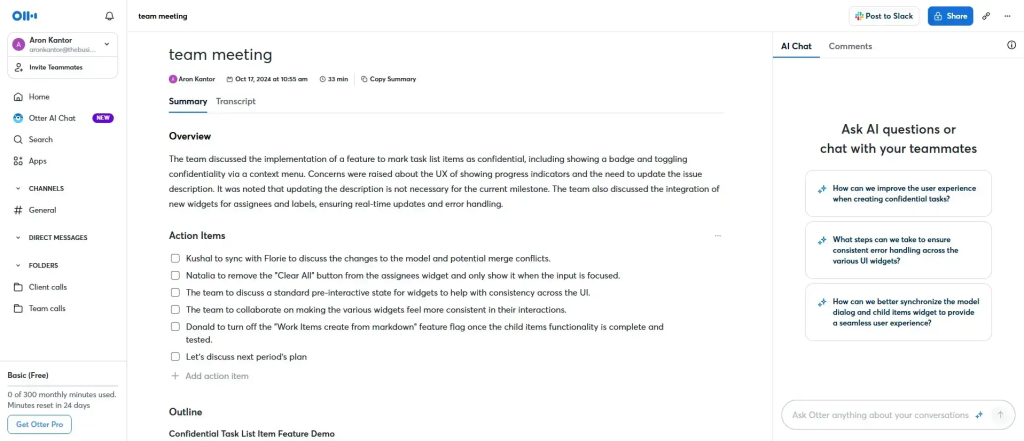
Otter delivers real-time, readable live transcription with live captions inside Zoom, Google Meet, and Microsoft Teams. Its standout Otter AI Chat lets you ask questions mid-call – things like “What were my action items?” or “Summarize the budget decision” – and it pulls answers straight from the conversation. Teams can simultaneously access, annotate, and comment on the transcript, creating shared understanding without post-meeting lag. You can also upload pre-recorded audio or video to transcribe, and review on the go with a solid mobile app.
Why choose Otter
Pick Otter if you need instant, in-meeting clarity and collaboration – live captions, live Q&A, and team comments in one place. It’s especially strong for hybrid teams that prioritize accessibility and fast alignment during the call, not after.
5. MeetGeek
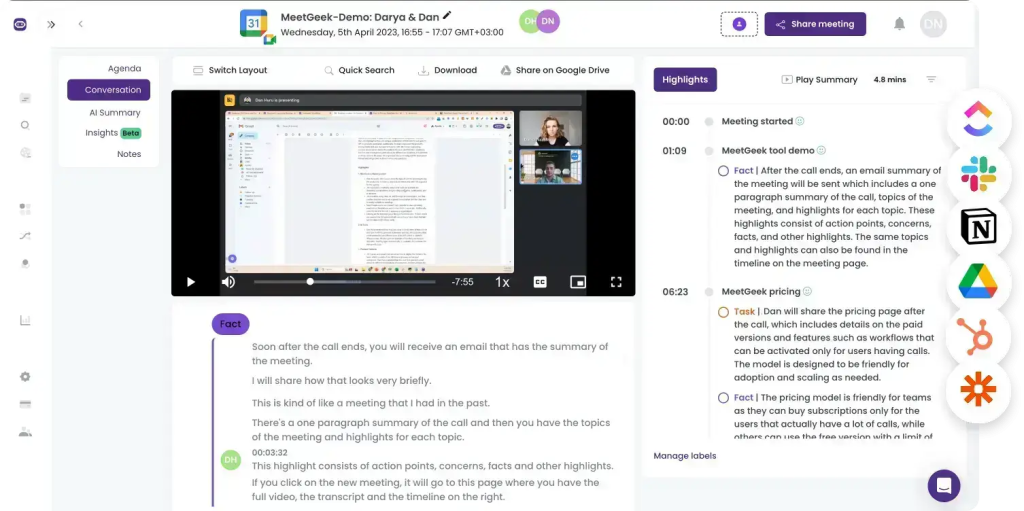
MeetGeek automates transcription and summarization while layering advanced analytics that surface engagement, talk ratios, and trends across your meetings. It focuses on accuracy and detail, producing thorough AI summaries with action items and key points that drop into a searchable team library. With thousands of integrations (Slack, HubSpot, Google Drive, Zapier), it fits neatly into existing workflows and scales from small teams to larger orgs. Customizable templates and GDPR-grade security help standardize note quality and keep compliance tight.
Why choose MeetGeek
Choose MeetGeek if you want transcripts that don’t just sit in a folder, but power coaching dashboards, standardized follow-ups, and team-wide knowledge sharing. It’s ideal for teams that value analytics, collaboration, and automated workflows as much as accurate notes.
6. Avoma
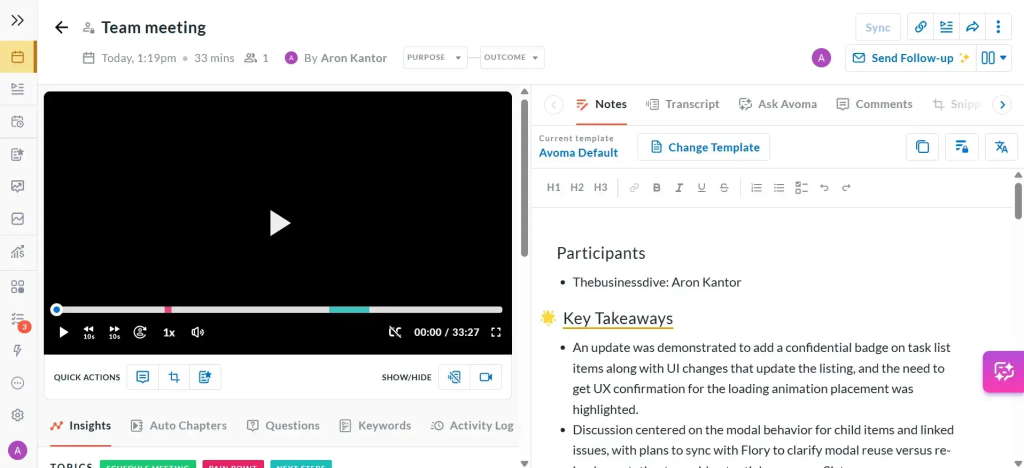
Avoma automates the end-to-end meeting lifecycle, delivering real-time transcription in 40+ languages, chapterized conversations, and AI notes with clear action items. It syncs summaries, tasks, and snippets directly to Salesforce, HubSpot, and more, removing manual logging and missed updates. Revenue teams get deal and conversation intelligence with risk flags, scorecards, and analysis against frameworks like MEDDIC. Built-in lead routing and round-robin scheduling reduce calendar ping-pong while keeping discovery and follow-ups consistent.
Why choose Avoma
Pick Avoma if you want structured transcripts that instantly translate into CRM-ready notes, action items, and coaching signals. It is ideal for sales and CS teams that need cross-meeting intelligence and faster follow-through than a basic notetaker can provide.
7. Read.ai
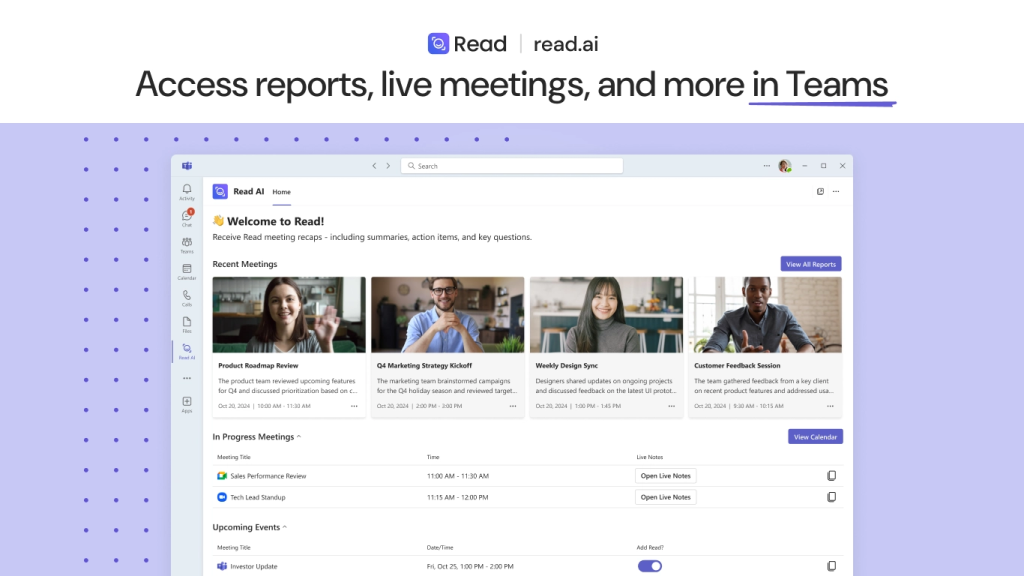
Read.ai records Zoom, Teams, and Google Meet, delivering real-time transcripts with instant summaries layered by engagement and sentiment. Its Speaker Coach gives on-the-fly feedback on talk time, clarity, and pacing so presenters can adjust mid-call. Search Copilot pulls answers across meeting transcripts, Slack, Teams, Gmail, and Outlook, accelerating decisions without manual digging. Post-call, you get playback with AI-marked highlights and detailed reports that show how the conversation actually landed.
Why choose Read.ai
Choose Read.ai if you want transcripts plus in-meeting analytics that coach your delivery and highlight sentiment in real time. It’s ideal for teams that need cross-app search and actionable insights, not just a text record of what was said.
Summary: Choosing the best Tactiq Alternative
The right pick depends on what you need from transcripts after the call – simple accessibility, searchable history, or a workflow that moves deals forward. If you want transcripts to become client-ready recaps, internal coaching notes, and automated follow-ups in one place, FuseBase is the strongest upgrade on this list. It turns every call into a branded mini-room with decisions, assets, and next steps, cutting admin and protecting margin.
Use this shortlist to choose quickly:
- Choose FuseBase if you want the most complete “from meeting to client room to next steps” system with internal vs client-ready split and automated trackers.
- Choose Fathom for instant post-call summaries, highlights, and CRM-ready notes with minimal setup.
- Choose Fireflies.ai for fast, platform-agnostic capture, searchable call libraries, and broad integrations on a budget.
- Choose Otter.ai for dependable live captions, in-meeting Q&A, and straightforward collaboration during the call.
- Choose MeetGeek for analytics-rich transcripts, standardized templates, and a team knowledge library.
- Choose Avoma for structured discovery, action items, and CRM-synced transcripts with coaching and pipeline intelligence.
- Choose Read.ai if you value sentiment, engagement metrics, and speaker coaching alongside real-time summaries.